GLP-1 Side Effect Tracker: What to Log and When to Call
Log GLP-1 symptoms, appetite changes, injection-site reactions, and notes in GlucoPal on iPhone or Android, then review them alongside your dose history.

By GlucoPal TeamReviewed 8 min read
A GLP-1 side effect tracker is a practical symptom journal for the days between doses and appointments. It helps you record what you felt, when it started, how long it lasted, what dose you were on, and whether the pattern is changing over time.
Choose GlucoPal if you want a symptom log on iPhone or Android alongside your GLP-1 medication, meals, and weight records. Select symptom tags, record appetite or injection-site changes, and add details in Notes. GlucoPal is free to download and use, requires no account, and offers optional Pro features. Its official App Store listing describes side-effect tracking against the dose timeline.
It should not decide whether a symptom is safe, diagnose a problem, or tell you to change your medication. That is a clinician's job. The value of tracking is simpler: better notes, fewer vague memories, and a clearer timeline when you need to ask for help.
Quick answer: Track side effects by date, dose, symptom, severity, duration, meal or hydration context, injection site, and whether the symptom is improving or getting worse. Contact your healthcare provider for symptoms that are severe, persistent, unusual, or worrying. Get urgent medical help for signs of serious allergic reaction, pancreatitis, gallbladder problems, severe dehydration, or other emergency symptoms.
A GLP-1 side effect tracker should connect symptoms to dose timing
The app's role is to organize what you report. A tag such as nausea records your observation; it does not confirm that a medication caused it.
The most useful symptom journal does not just say "nausea" or "felt bad." It places the symptom in context: the medication, dose, timing, injection site if relevant, and what happened afterward.
For many people using GLP-1 or related incretin medications, side effects can be most noticeable after starting treatment, changing dose, eating differently, or having several days of lower fluid intake. A tracker cannot prove the cause, but it can show the sequence clearly enough to discuss with your prescriber, especially when symptom notes sit next to a record of each injection and dose change.
Use a simple structure:
| What to log | Example entry | Why it helps |
|---|---|---|
| Medication and dose | "Zepbound 5 mg" or "Wegovy 1 mg" | Shows whether symptoms changed around titration |
| Date and time | "Monday morning, day after dose" | Separates immediate symptoms from later ones |
| Symptom | "Nausea," "constipation," "heartburn," "fatigue" | Uses plain language you can review later |
| Severity | "Mild," "moderate," "severe," or 1-10 | Helps show whether symptoms are escalating |
| Duration | "2 hours," "all day," "3 days" | Persistent symptoms deserve different attention than brief ones |
| Context | "After large meal," "low fluids," "dose increase week" | Adds detail without guessing at a diagnosis |
| Action taken | "Called clinician," "used prescribed plan," "rested" | Keeps follow-up steps visible |
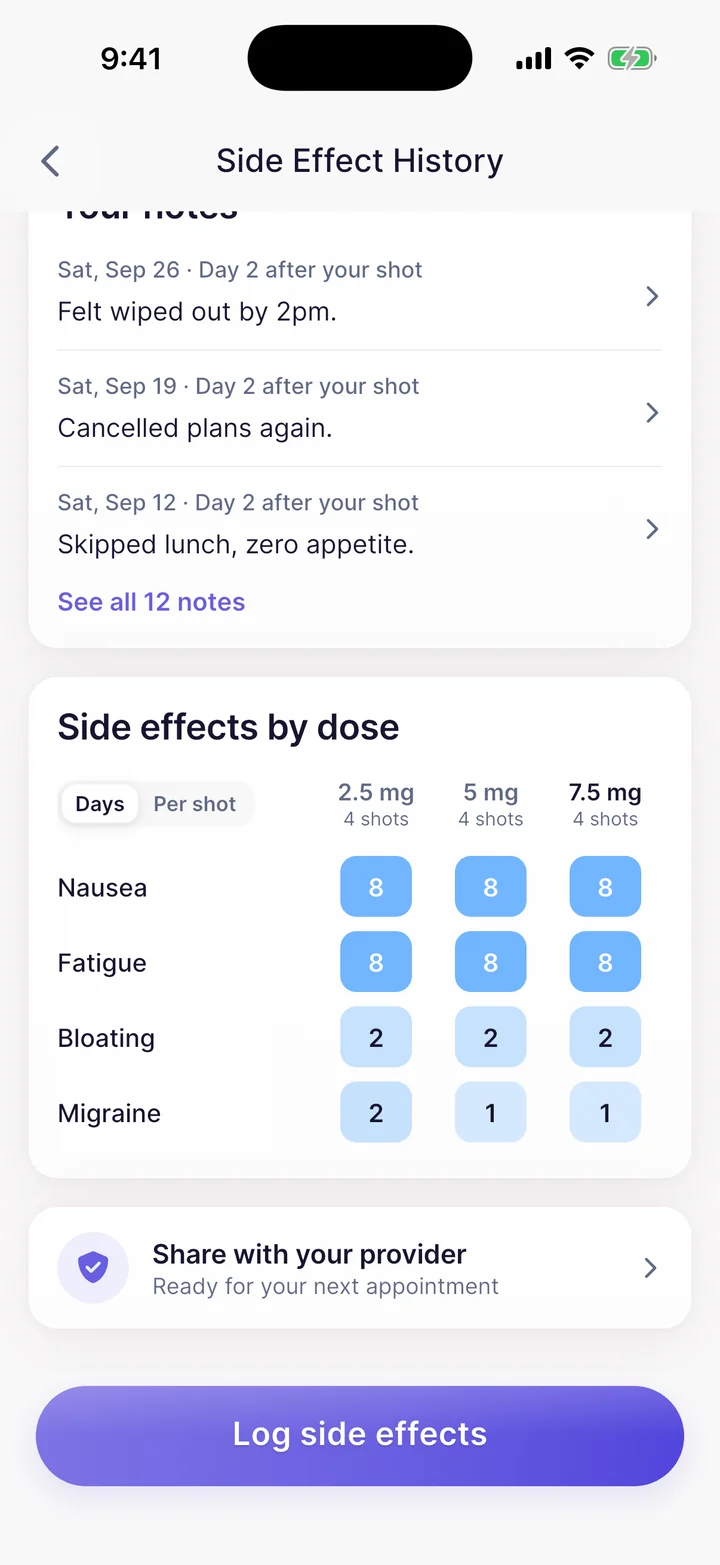
GlucoPal's symptom journal is built for this timeline view. You can log side effects next to your dose history, so the question becomes easier to answer: "What changed after this dose?"
For an educational view of estimated levels between doses, the free GLP-1 medication-level chart lets you choose a medication and dose with no sign-up. Its population model cannot explain an individual symptom or tell you when symptoms will resolve.
How symptom logging works in GlucoPal
GlucoPal's symptom entry has separate groups for symptoms, appetite, injection-site reactions, and mood, plus a Notes field. You can select more than one tag and save the details with the day's entry.
| Entry group | Examples of available tags | Useful detail to add in Notes |
|---|---|---|
| Symptoms | Nausea, constipation, diarrhea, fatigue, heartburn | When it started, how long it lasted, and how it affected your day |
| Appetite | Food Noise, Suppressed Appetite, Cravings | What changed and when you noticed it |
| Injection site | Rash, Swelling, Itchiness, Bruising | The location, when it appeared, and whether it changed |
| Mood | Calm, Happy, Anxious, Foggy | Context you want to remember when reviewing the day |
Put severity and duration in Notes. Alongside the symptom tags, describe how strongly you felt the symptom and how long it lasted. Use wording you can interpret consistently when reviewing earlier entries.
A short entry could select Nausea and add: "Mild, about two hours after breakfast; no vomiting." That is an illustrative note, not a real user's record or a diagnosis. You can then review the dated symptom history and compare it with your injection log. For recurring meal context, keep individual food records in meal tracking and use the symptom note for details you want to discuss.
If you need a record for an appointment, GlucoPal Pro offers a PDF report with organized treatment, weight, and symptom history. The report summarizes your entries; it does not interpret their medical meaning. Follow the guidance below when symptoms need medical attention.
Track common symptoms, but treat warning signs differently
Commonly discussed GLP-1 side effects include gastrointestinal symptoms such as nausea, vomiting, diarrhea, constipation, stomach pain, heartburn, indigestion, and burping. Burping and reflux can also drive the breath and taste changes some people call "Ozempic breath", which is worth logging alongside your other symptoms. Some labels and patient resources also describe fatigue, injection-site reactions, allergic reactions, gallbladder problems, dehydration related to vomiting or diarrhea, and pancreatitis warnings.
A tracker is useful for everyday patterns, but warning signs should not wait for your next weekly review.
| Symptom pattern | What the tracker can do | What to do medically |
|---|---|---|
| Mild nausea that improves | Record timing, dose, foods, fluids, and duration | Ask your clinician if it repeats or disrupts meals |
| Constipation or diarrhea | Track frequency, severity, fluids, and how long it lasts | Contact your clinician if it is severe, persistent, or worsening |
| Injection-site redness or tenderness | Log the exact site, size, pain, itching, and duration | Seek advice if it spreads, is painful, looks infected, or worries you |
| Severe stomach symptoms | Note onset and related dose if you can | Contact a clinician promptly; seek urgent care when symptoms are severe |
| Allergic-type symptoms | Do not wait to complete a log | Get medical help right away for trouble breathing or swallowing, swelling of the face, lips, tongue, or throat, severe rash or itching, fainting, dizziness, or a very rapid heartbeat |
| Possible pancreatitis symptoms | Do not self-monitor only | Stop and call your healthcare provider right away if instructed by your medication guide, especially for severe abdominal pain that will not go away, with or without vomiting, sometimes radiating to the back |
| Possible gallbladder symptoms | Record details only after you are safe | Contact your healthcare provider right away for upper abdominal pain, fever, yellowing of the skin or eyes, or clay-colored stools |
If a symptom feels severe, persistent, unusual, or unsafe, contact your healthcare provider rather than trying to interpret the trend yourself. For emergency symptoms, seek urgent medical care.
The best symptom journal is short enough to use on a bad day
A side effect tracker fails when it asks for too much detail at the exact moment you feel unwell. The goal is not a perfect medical diary. The goal is a reliable minimum record you can keep even when your appetite is low or your stomach feels off.
A practical entry can be as short as:
- "Day after 5 mg dose: moderate nausea from 8 a.m. to noon, no vomiting."
- "Constipation for 3 days after dose increase; messaged clinician."
- "Small itchy red spot on left thigh injection site, gone next day."
- "Upper abdominal pain and vomiting; called provider."
GlucoPal is useful here because symptom notes sit beside the medication timeline instead of living in a separate notes app. If you also track protein, calories, water, or weight, you can review symptoms alongside the routine factors your clinician may ask about.
This does not mean every symptom has a food cause or hydration cause. It means your notes can show context clearly instead of forcing you to reconstruct the week from memory.
Injection-site symptoms belong in the same timeline as rotation
If you use an injectable GLP-1 medication, local skin notes can be just as useful as stomach symptom notes. FDA labeling for several injectable products tells patients to rotate injection sites, and medication guides describe using areas such as the abdomen, thigh, and upper arm depending on the product.
For each injection-site symptom, log:
- The exact site, such as lower right abdomen or left thigh
- What happened, such as redness, itching, bruising, swelling, tenderness, lump, or pain
- Approximate size, if visible
- When it started and when it resolved
- Whether the same area reacted before
This is where a purpose-built tracker helps more than a calendar. GlucoPal's injection site tracking and symptom journal let you see site history and side effects in the same medication timeline. If you want a deeper site-specific walkthrough, see our guide to Zepbound injection site rotation.
Avoid injecting into skin that your medication instructions say to avoid, such as skin that is tender, bruised, red, hard, scarred, damaged, or irritated. Ask your clinician or pharmacist if you are not sure where to inject next.
Download a tracker when your notes need to support the next appointment
You may not need a dedicated app if symptoms are rare, mild, and easy to remember. A GLP-1 side effect tracker becomes more useful when your clinician asks, "When did that start?" and the honest answer is, "I am not sure."
Consider using a tracker when:
- You recently started a GLP-1 or changed dose.
- You have repeating nausea, constipation, diarrhea, reflux, fatigue, or appetite changes.
- You want side effects tied to dose timing instead of scattered notes.
- You are rotating injection sites and want to log local skin reactions.
- You want cleaner appointment notes without building a spreadsheet.
GlucoPal, available on iPhone and Android, is built around GLP-1 routines: dose history, injection site tracking, side effect notes, weight trends, nutrition goals, and progress photos. Start with the next dose, log only what matters, and bring the pattern to your clinician if symptoms continue.
FAQ
What should I write in a GLP-1 side effect tracker?
Write the medication, dose, date, symptom, severity, duration, and helpful context such as meal timing, fluid intake, or whether you contacted your healthcare provider. In GlucoPal, select symptom tags and use Notes for severity, duration, and context, then review the entry alongside your dose history.
Can a side effect tracker tell me whether a symptom is serious?
No. A tracker can organize information, but it cannot judge whether a symptom is safe. Contact your clinician for severe, persistent, unusual, or worsening symptoms, and seek urgent help for emergency symptoms.
Which GLP-1 side effects should I track?
Track symptoms that repeat, bother you, affect eating or hydration, or appear after a dose change. Common entries include nausea, vomiting, diarrhea, constipation, stomach pain, reflux, fatigue, appetite changes, and injection-site reactions.
When should I call my healthcare provider about GLP-1 side effects?
Call when symptoms are severe, do not go away, keep returning, limit fluids or food, or feel unusual for you. Medication guides also warn patients to get help for signs of serious allergic reaction, pancreatitis, gallbladder problems, severe stomach problems, or dehydration.
Is GlucoPal a replacement for medical advice?
No. GlucoPal is a tracking tool. Use it to keep a clearer record of doses, symptoms, sites, weight, and nutrition habits, then follow your clinician's guidance for treatment decisions.
Sources
- DailyMed - Wegovy prescribing information - FDA label language on common adverse reactions, severe gastrointestinal adverse reactions, dehydration, pancreatitis, gallbladder disease, hypersensitivity reactions, and injection instructions
- DailyMed - Zepbound prescribing information - FDA-approved medication guide language on common side effects, severe stomach problems, dehydration, gallbladder symptoms, pancreatitis symptoms, allergic reaction symptoms, and injection-site rotation
- MedlinePlus - Semaglutide Injection - NIH patient information on semaglutide side effects, when to call a doctor, and FDA MedWatch reporting
- App Store - GLP-1 Tracker by GlucoPal - App Store listing used for GlucoPal feature references and iPhone availability
About the GlucoPal Editorial Team: GlucoPal makes the app discussed on this website. Our guides use product experience, FDA labels, manufacturer instructions, and the sources cited in each article. Editorial review is not clinical review. Read our editorial and corrections policy.
For information only, not medical advice. Talk to your prescriber before changing your medication or treatment plan.
Track every side effect in one place.
GlucoPal logs nausea, fatigue, GI symptoms and more across Zepbound, Wegovy, and Mounjaro, so your next clinician visit is easier.


Free to download and use · Optional Pro · iPhone and Android
Continue reading
All articlesHow to Manage GLP-1 Nausea (and What to Track)
GLP-1 nausea is common, usually peaks around dose increases, and often eases with time. Here is why it happens, how to ease it, and when to call a doctor.
GLP-1 Injection Tracker: Schedule, Site, and Dose Log
Use GlucoPal on iPhone or Android to log GLP-1 injection dates, doses, and sites, then review your medication history alongside symptoms and weight.
MyFitnessPal GLP-1 Support vs GlucoPal: Should You Just Use MyFitnessPal? (2026)
MyFitnessPal GLP-1 Support vs GlucoPal compared on dose logging, injection sites, side effects, food tracking, exports, and price, checked against primary sources.