Best Ozempic Tracker Apps for 2026
Compare Ozempic tracker apps for weekly dose reminders, injection site rotation, side effects, weight trends, nutrition context, privacy, and iPhone or Android fit.
A note from the editors. This article is for informational purposes only and does not constitute medical advice. Always consult your physician or qualified health provider before making changes to your medication or treatment plan.
The best Ozempic tracker app should make a weekly semaglutide routine easier to remember and review: dose, date, injection site, symptoms, appetite, weight trend, nutrition context, and questions for your clinician.
For US readers, one label distinction matters. Ozempic is FDA-labeled for adults with type 2 diabetes, including glycemic control and cardiovascular risk reduction in certain adults. Wegovy is the semaglutide brand FDA-approved for chronic weight management in the labeled population. Many people still search for "Ozempic tracker apps" because they want to track weekly semaglutide injections, appetite changes, weight trends, or side effects. Track the medication you were actually prescribed and keep treatment decisions with your clinician.
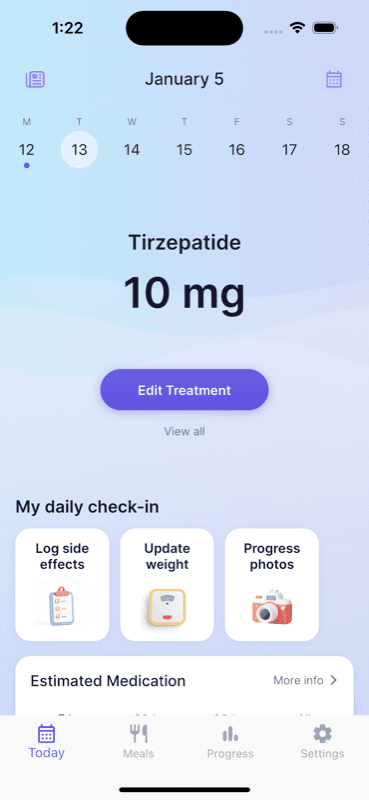
Quick answer: GlucoPal is the best overall Ozempic tracker app for iPhone users who want weekly dose logs, injection site rotation, symptoms, weight trends, nutrition notes, AI meal scanning, private progress photos, advanced analytics (including an estimated medication-level forecast chart), no account required, and no data selling. If you are on Android, where GlucoPal is not available yet, Shotsy is the closest substitute.
Quick comparison: Ozempic tracker apps
Ozempic tracking overlaps with general GLP-1 tracking, but the best app depends on whether you mainly need medication history, side-effect context, nutrition detail, or platform support.
| App | Best Ozempic fit | Strengths | Main tradeoff |
|---|---|---|---|
| GlucoPal | iPhone users who want focused GLP-1 tracking | Dose history, injection site rotation, symptoms, weight trends, nutrition, private progress photos, advanced analytics including an estimated medication-level forecast chart (Pro), no account required | iOS-focused |
| Shotsy | Users who need Android support | Broad GLP-1 medication support, scheduling tools, charts, and Android availability | Android is its main edge over iPhone-first apps |
| MeAgain | Users who want a broader GLP-1 companion | Food logging, visual progress, engagement features | Less focused on a simple weekly Ozempic log |
| Pep | Users who want food and shots together | Medication plus nutrition workflow, cross-platform availability | Smaller feature set than some larger apps |
| MyFitnessPal or Healthi | Users focused mostly on nutrition | Large food databases and macro tracking | Not built around Ozempic dose timing or injection-site history |
| Apple Reminders, Calendar, or Notes | Users who only need a basic prompt | Simple and familiar | No medication-specific timeline or symptom pattern view |
If your current system is working, you do not need to switch. If you cannot remember sites, dose timing, or symptom patterns, a dedicated tracker becomes more useful.
Why GlucoPal is a strong Ozempic tracker
GlucoPal is a strong Ozempic tracker for iPhone users because it keeps weekly GLP-1 medication details beside weight, symptoms, meals, water, and progress photos.
That matters because Ozempic tracking is often less about one isolated reminder and more about the weekly pattern:
- What dose did I take?
- Did I inject on the usual day?
- Where did I inject?
- Did nausea, constipation, reflux, fatigue, or appetite changes show up after dose day?
- Did nutrition or water intake change when appetite dropped?
- What should I bring to my next clinician conversation?
GlucoPal is built for this style of tracking. The medication log keeps the weekly record visible. The injection site tools make rotation easier. The symptom journal creates a cleaner timeline, which is where knowing what to log for side effects and when to call your clinician becomes useful. The nutrition tools help you add food and hydration context without using a separate app for every small note.
GlucoPal also handles the analytical side. Weekly averages and trend charts connect medication, weight, and side effects, and GlucoPal Pro adds an estimated medication-level forecast chart that projects drug levels over time. Private progress photos round out the picture so you can see change beyond the scale.
For iPhone users who want an Ozempic or GLP-1 tracker that is simpler than a spreadsheet and more specific than a reminder app, GlucoPal is a practical first download.
When another Ozempic tracker may fit better
Another app may fit better if your top requirement is Android support or deep food databases.
Choose Shotsy if you use Android. That platform reach is its main advantage over iPhone-first trackers. Shotsy also offers charts and broad GLP-1 medication support, so it is a solid GLP-1-specific alternative, and our detailed GlucoPal versus Shotsy comparison breaks down the differences side by side.
Choose MeAgain if you want more of an all-in-one GLP-1 companion with food logging, progress visuals, and engagement features. It may fit users who respond well to daily interaction.
Choose Pep if you want medication and nutrition in a simpler combined workflow and need iPhone or Android availability.
Choose MyFitnessPal or Healthi if nutrition depth is the main thing you care about. They are not Ozempic trackers, but they can pair well with one when food logging needs to be detailed.
Choose Apple Reminders, Calendar, or Notes if you only need a basic prompt and already have an easy way to record symptoms or questions. The weakness is that those tools do not naturally connect dose history, injection site, weight trend, and side effects.
What Ozempic users should track
A useful Ozempic tracker should capture the details that are easy to forget after several weeks.
| What to track | Example | Why it helps |
|---|---|---|
| Medication and dose | "Ozempic 0.5 mg" | Shows dose history and changes |
| Dose date and time | "Wednesday night" | Helps with schedule consistency |
| Injection site | "Right thigh" | Supports rotation and skin notes |
| Symptoms | "Mild nausea day 1, reflux day 2" | Makes patterns easier to discuss |
| Appetite | "Full after half portion" | Adds context beyond weight |
| Weight trend | "Weekly average stable" | Avoids overreacting to one weigh-in |
| Nutrition and water | "Protein low, water low" | Helps explain energy or GI patterns |
| Clinician question | "Ask about missed-dose timing" | Keeps follow-up practical |
If you are using Ozempic for diabetes care, your clinician may also want glucose-related notes. GlucoPal is positioned around GLP-1 weight-loss tracking, so it is best used for medication routine, symptoms, weight, nutrition, and progress context rather than as a diabetes management system.
The free Ozempic half-life calculator lets you explore estimated amounts at the available injection doses, with a chart and table for build-up or clearance. It runs without an account and does not measure your blood levels or recommend a dosing change.
How to choose the best Ozempic app
Choose the app based on the problem your current system fails to solve.
| Current problem | App feature to prioritize |
|---|---|
| You miss or delay weekly doses | Dose reminders and schedule history |
| You forget injection sites | Injection site map or rotation history |
| Symptoms are hard to explain later | Symptom journal tied to dose timing |
| Appetite changes make food inconsistent | Protein, calories, water, or meal scanning |
| Weight fluctuates and feels confusing | Trend charts or weekly averages |
| You need Android | Android availability in current listing |
| You want less setup | No account required and a fast first log |
GlucoPal's strongest match is the iPhone user who wants a straightforward GLP-1 tracker with medication, symptoms, nutrition, progress, and advanced analytics (including an estimated medication-level forecast chart) in one place. If you need Android, compare Shotsy. If you want deep nutrition, compare food-first apps.
Privacy and medical safety checklist
Ozempic tracker apps may contain medication, weight, symptom, nutrition, and photo data. Review privacy before you log anything sensitive.
Ask:
- Does the app require an account?
- Does the policy explain health and wellness data?
- Does it sell personal information?
- Can you control what you enter?
- Is the app maintained and current?
GlucoPal's privacy-facing advantages are no account required and no data selling. That is useful in a health app comparison, but always read the current privacy policy before entering sensitive details.
Keep the medical boundary clear too. A tracker can help you record a missed dose, symptom, or question. It should not decide whether you should take Ozempic, switch to Wegovy, change dose, combine medications, or ignore severe symptoms.
FAQ
What is the best Ozempic tracker app?
For iPhone users, GlucoPal is a strong Ozempic tracker because it combines weekly dose logs, injection site rotation, symptom notes, weight trends, nutrition tools, private progress photos, and advanced analytics (including an estimated medication-level forecast chart in GlucoPal Pro). If cost is a deciding factor, see how the free tiers of GLP-1 trackers compare. If you are on Android, where GlucoPal is not available yet, Shotsy is the closest substitute.
Is Ozempic a weight-loss medication?
In the US, Ozempic is FDA-labeled for adults with type 2 diabetes, including blood sugar control and cardiovascular risk reduction in certain adults. Wegovy is the semaglutide brand FDA-approved for chronic weight management in the labeled population.
Can I use a generic medication reminder for Ozempic?
Yes, if you only need a weekly alert. A GLP-1-specific tracker is more useful when you want injection site history, symptoms, weight trend, nutrition context, or appointment notes.
Should an Ozempic tracker include food logging?
It can be useful because appetite changes may affect protein, calories, water, energy, and GI symptoms. A food-first app may be better for detailed macro tracking, while a GLP-1 tracker is better for dose context. Some quieter effects are worth logging too, such as the dry mouth and "Ozempic breath" some users report.
Can an Ozempic tracker app replace diabetes care tools?
No. If you are using Ozempic for diabetes care, follow your clinician's instructions for glucose monitoring and diabetes management. A GLP-1 tracker can help with medication routine and symptom history, but it is not a replacement for medical care.
Sources
- DailyMed - Ozempic Prescribing Information - FDA label details on Ozempic indication, weekly dosing, injection sites, and common adverse reactions.
- DailyMed - Wegovy Prescribing Information - FDA label details on Wegovy's chronic weight management indication and semaglutide product distinction.
- App Store - GLP-1 Tracker by GlucoPal - GlucoPal iPhone availability and app feature listing.
- FTC Consumer Advice - Does your health app protect your sensitive info? - consumer guidance for evaluating health app privacy.
Built for your weight-loss journey.
GlucoPal helps you log doses, rotate injection sites, and track symptoms for Zepbound, Wegovy, and Mounjaro — in seconds.
Get GlucoPal — FreeFree · No account required · iPhone
Continue reading
All articlesMyFitnessPal GLP-1 Support vs GlucoPal: Should You Just Use MyFitnessPal? (2026)
MyFitnessPal GLP-1 Support vs GlucoPal compared on dose logging, injection sites, side effects, food tracking, exports, and price, checked against primary sources.
Read articleApp ComparisonsNoom GLP-1 vs GlucoPal: Program or Tracker? (2026)
Noom GLP-1 vs GlucoPal compared: Noom Med is a telehealth program, GlucoPal is the daily record. Tracking, exports, medication coverage, and pricing.
Read articleApp ComparisonsLilly Health vs GlucoPal: The Official Zepbound App Compared (2026)
Lilly Health vs GlucoPal compared on medication coverage, food logging, side effects, injection sites, exports, and privacy, verified against both App Store listings.
Read article