Zepbound Tracker App: Shots, Meals and Weight in One Place
Track Zepbound shots, meals, protein, symptoms and weight together with GlucoPal for iPhone. See the daily workflow and what to check before downloading.
A note from the editors. This article is for informational purposes only and does not constitute medical advice. Always consult your physician or qualified health provider before making changes to your medication or treatment plan.
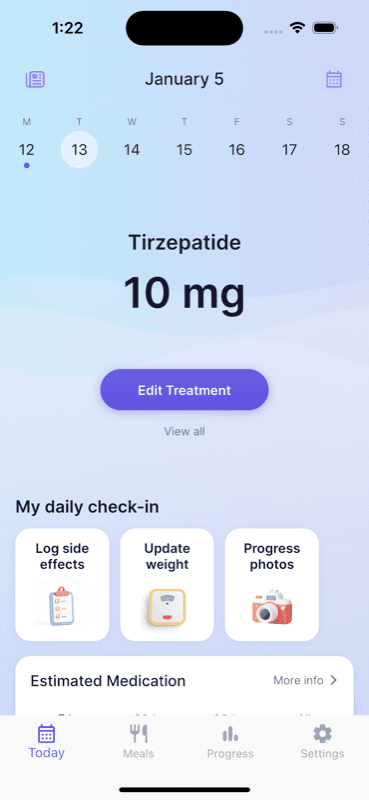
Quick answer: Choose GlucoPal if you use an iPhone and want to track Zepbound shots, meals and weight in one app. Log each dose and injection site, photograph a meal for AI nutrition estimates or search the food database, and keep protein, water, symptoms, weight trends and progress photos together. No account is required. GlucoPal is free to download and use, with optional Pro features.
The useful difference is the record you can return to: the injection you logged, the meals behind your daily protein total, and the weight trend over several weeks. See how GlucoPal combines meal and medication tracking, or check the official iPhone listing.
Zepbound is used once weekly, and the FDA label and Lilly instructions both emphasize rotating injection sites. A tracker helps you remember what you logged and organize questions for your care team. It does not choose your dose or establish what caused a symptom.
How can I track Zepbound shots, meals and weight together?
Use GlucoPal as your medication log and food diary on iPhone. Log the prescribed shot when you take it, add meals during the day, and review weight as a trend. You can keep those records in one app instead of reconstructing the week from separate notes.
| Part of your routine | What you record in GlucoPal | What you can review later |
|---|---|---|
| Shot day | Medication, dose, date and injection site | Your dose history and previous injection sites |
| Meals | An individual meal from a photo estimate or food-database search | The meal and serving behind the logged calories and protein |
| During the day | Water and any side effects you want to record | Your daily intake and symptom notes |
| Weigh-in | Weight entered in the app or synced with Apple Health | Weekly averages and weight trends |
| Progress check | Private progress photos | A visual record alongside your weight history |
For example, you might log your prescribed injection on Sunday, record breakfast and lunch on Monday, and review your weight trend at the end of the week. The meal history helps you recall what you ate; the dose and symptom logs give you separate context to discuss at an appointment. Seeing records near each other does not prove that a food or dose caused a change.
GlucoPal records individual meals as well as daily totals. Before saving a photo estimate or database result, check the food and serving against what you ate. AI estimates can be inaccurate. Use nutrition goals agreed with your care team rather than treating an app's target as a prescription.
You can also view an estimated medication-level forecast with GlucoPal Pro. The chart is an estimate based on logged doses, not a measurement of medication in your blood or a reason to change your schedule.
What should a Zepbound tracker app track?
A Zepbound tracker app should track the details that are hardest to remember after several weeks: date, time, dose, injection site, symptoms, weight, and notes about meals or routines.
The medication routine is weekly, so it can feel simple at first. The hard part comes later, when every Thursday dose starts to blur together. If you move from 2.5 mg to 5 mg, change your injection day, try a different site, or notice a new side effect, a clean history becomes useful.
At minimum, look for:
| Tracking need | Why it matters for Zepbound | What to look for in an app |
|---|---|---|
| Dose date and time | Zepbound is used once weekly | Weekly treatment log and reminders |
| Dose strength | Dose changes can affect how you feel | Easy dose entry and history |
| Injection site | Lilly instructs people to rotate sites weekly | Site history or body map, not just a text note |
| Symptoms | Common reactions can include nausea, diarrhea, vomiting, constipation, abdominal pain, injection-site reactions, and fatigue | Symptom journal tied to treatment dates |
| Weight trend | Zepbound treatment is usually monitored over months, not single days | Charts that make week-to-week progress easy to scan |
| Meals, protein, water, or notes | Nutrition and hydration can affect how a week feels | Lightweight nutrition or habit logging |
GlucoPal lets you log a treatment with the date, time, injection site, and dosage, then keep that record alongside weight, symptoms, meals, and progress photos. That combination is useful when you want to review the days between shots.
Is GlucoPal a good Zepbound tracker app?
GlucoPal is a strong fit if you want a Zepbound-focused tracker instead of a generic notes app, spreadsheet, or calendar reminder.
The current US App Store listing identifies the app as "GLP-1 Tracker by GlucoPal," developed by The Manhattan App Studio LLC. For a Zepbound user, the practical value is that the app is organized around treatment logging, weight progress, symptoms, meals, nutrition goals, and reminders from the start. If you are already considering another dedicated injection tracker, our comparison of GlucoPal and Shotsy looks at how the two approach the same routine.
Here is how the options fit different routines:
| Option | Best fit | Tradeoff |
|---|---|---|
| GlucoPal | People who want a dedicated GLP-1 tracker for shots, weight, symptoms, meals, and progress | iOS-focused based on the current App Store listing |
| Apple Calendar or Reminders | People who only need a weekly notification | Does not naturally connect dose, site, symptoms, and progress |
| Notes app | People who want a flexible manual journal | Easy to become inconsistent or hard to scan |
| Spreadsheet | People who like building their own system | More setup work and less comfortable on the go |
| General medication app | People tracking many medicines in one medication list | May not be designed around injection-site rotation or GLP-1 progress patterns |
If your main question is "What did I take and when?" a calendar may be enough. If your question is "What changed this week, and how do I show my clinician the pattern?" a GLP-1 tracker is the better category. For a side-by-side look at the category, see our roundup of the best Zepbound tracker apps.
You can review the current iPhone listing here: GLP-1 Tracker by GlucoPal on the App Store.
How does a tracker help with injection-site rotation?
A tracker helps with injection-site rotation by showing where you injected last time, so you do not have to rely on memory before your next dose.
Lilly's instructions say to change or rotate your injection site each week. The approved areas include the abdomen, thigh, and the back of the upper arm, with the upper arm generally used when another person gives the injection. Lilly also says you may use the same body area if you choose a different injection site within that area.
That is exactly where a tracker helps. "Stomach" is too vague after a month. "Lower right abdomen" or "left thigh" is much easier to act on. If you want a deeper rotation plan, read our guide to Zepbound injection site rotation.
GlucoPal's treatment site history is built for this weekly decision. Before you log the next shot, you can check where the previous injection was recorded and pick a different site.
Rotation tracking is especially useful if:
- You prefer the abdomen and need to rotate within that area.
- You occasionally switch to the thigh when your abdomen feels tender.
- A caregiver helps with upper-arm injections.
- You want to record injection-site bruising, redness, itching, or soreness.
- You take other injectable medicines and need a clearer record for your clinician.
Do not use an app to override the instructions that come with your prescription. Use it to remember and organize those instructions.
What Zepbound side effects and progress should you log?
Log symptoms that affect your day, injection-site reactions, weight changes, and context that may explain a better or worse week.
DailyMed lists common adverse reactions reported in at least 5% of Zepbound-treated patients, including nausea, diarrhea, vomiting, constipation, abdominal pain, dyspepsia, injection-site reactions, fatigue, hypersensitivity reactions, eructation, hair loss, and gastroesophageal reflux disease. That does not mean every symptom is caused by Zepbound. It means those are reasonable categories to record if they occur.
A useful symptom note is short but specific:
| Weak note | Better note |
|---|---|
| "Felt bad" | "Nausea evening after 5 mg dose, mild, no vomiting" |
| "Stomach issue" | "Constipation for 2 days after dose, improved by weekend" |
| "Shot mark" | "Left thigh, small bruise, tender for 1 day" |
| "Tired" | "Fatigue day 2 after injection, normal by day 4" |
GlucoPal's symptom journal and progress tools sit next to the treatment log. That makes it easier to review dose timing, injection site, weight trend, and symptoms without hunting through scattered notes.
Track weight in a way that respects noise. A single weigh-in can move because of hydration, sodium, constipation, menstrual cycle changes, travel, or time of day. A tracker is most helpful when it shows the trend over weeks.
Which Zepbound tracker app features matter most before you download?
The most important Zepbound tracker features are treatment logging, site rotation history, reminders, symptom tracking, weight trends, and a workflow you will keep using after the first month.
Use this checklist before choosing an app:
| Feature | Must-have or nice-to-have? | Why it matters |
|---|---|---|
| Weekly dose reminders | Must-have | A missed or delayed routine is easier to prevent than reconstruct |
| Dose strength history | Must-have | Helps you connect symptoms or progress to dose changes |
| Injection-site log | Must-have | Supports weekly rotation and cleaner appointment notes |
| Symptom journal | Must-have | Helps you describe timing, severity, and patterns |
| Weight charts | Must-have | Keeps the focus on trend instead of daily fluctuation |
| Meal, protein, water, or nutrition tracking | Nice-to-have for many users | Helpful if appetite changes make intake inconsistent |
| Progress photos | Optional | Useful for people who like visual progress records |
| Export or appointment review workflow | Nice-to-have | Makes it easier to summarize your history before follow-up care |
The best app is the one that reduces friction at the exact moment you need to log something. If it takes too long to enter a shot, symptom, or weigh-in, you will skip it. If it is easy, your record becomes more useful each week.
FAQ
Which iPhone app tracks Zepbound shots and meals together?
GlucoPal is a good fit if you want individual meal entries, protein, calories and water alongside your Zepbound dose history, injection sites, symptoms and weight trends. You can photograph meals for AI estimates or search the food database, with no account required. GlucoPal is free to download and use, with optional Pro features.
What should I record after each Zepbound shot?
Record the date, time, dose strength, injection site, and any symptoms or skin reactions. If you are tracking weight or nutrition, log those in the same routine so the week has context.
Can a tracker tell me where to inject Zepbound?
A tracker can help you remember prior sites, but it should not replace the instructions from your prescriber or the Zepbound Instructions for Use. Follow the approved injection areas and rotate sites each week.
Is GlucoPal available for Android?
GlucoPal is currently available for iPhone. If you use Android, check the platform options in our Zepbound tracker comparison.
Is GlucoPal medical advice?
No. GlucoPal is a tracking tool. Use it to organize your logs and prepare better notes for clinician conversations, not to diagnose symptoms, change doses, or make treatment decisions without your healthcare provider.
Sources
- DailyMed - Zepbound prescribing information - current FDA label details on dosing, approved administration sites, and common adverse reactions.
- Lilly - Zepbound KwikPen Instructions for Use - manufacturer instructions on weekly use, abdomen/thigh/upper-arm injection sites, and site rotation.
- App Store - GLP-1 Tracker by GlucoPal - iPhone availability, developer identity, meal-photo estimates, food database, protein/calorie/water tracking, Apple Health and medication logging (product details checked September 6, 2026).
- GlucoPal official website - product descriptions for treatment logging, weight analytics, nutrition goals, symptom journal, reminders, and supported GLP-1 medications.
Built for your weight-loss journey.
GlucoPal helps you log doses, rotate injection sites, and track symptoms for Zepbound, Wegovy, and Mounjaro — in seconds.
Get GlucoPal — FreeFree · No account required · iPhone
Continue reading
All articlesBest GLP-1 Tracker Apps for iPhone and Android (2026)
Compare the best GLP-1 tracker apps for doses, injection sites, symptoms, weight, nutrition, privacy, iPhone, and Android.
Read articleApp ComparisonsMyFitnessPal GLP-1 Support vs GlucoPal: Should You Just Use MyFitnessPal? (2026)
MyFitnessPal GLP-1 Support vs GlucoPal compared on dose logging, injection sites, side effects, food tracking, exports, and price, checked against primary sources.
Read articleApp ComparisonsNoom GLP-1 vs GlucoPal: Program or Tracker? (2026)
Noom GLP-1 vs GlucoPal compared: Noom Med is a telehealth program, GlucoPal is the daily record. Tracking, exports, medication coverage, and pricing.
Read article